
Switching between your programs
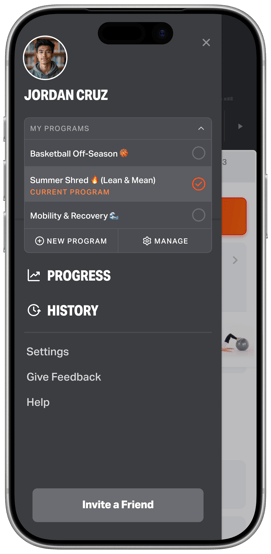
Your programs live in the program switcher at the top of the side menu. Your most recent active program is labeled “Current Program.”
To switch programs, open the side menu, tap the program switcher, and choose the program you want to train on. Volt instantly loads that program's training.
Starting a new program
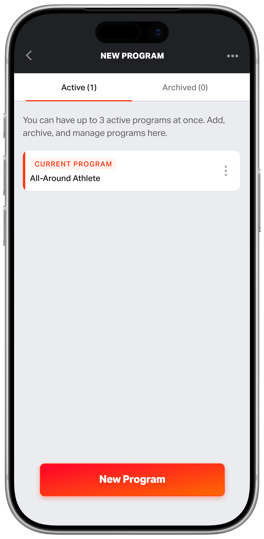
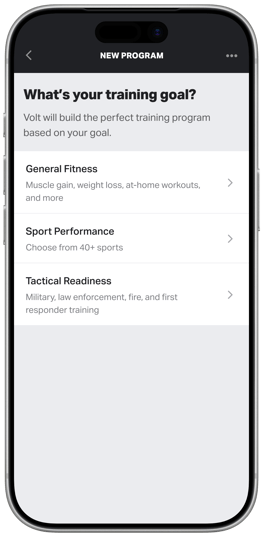
From the program switcher, tap New Program to get started. Go through the guided flow and Volt will build you a brand-new program. Give your program a name (add emojis if you want 👀) and hit save. Once you've made your selection, your new program is added to the switcher and ready to go.
Managing your programs
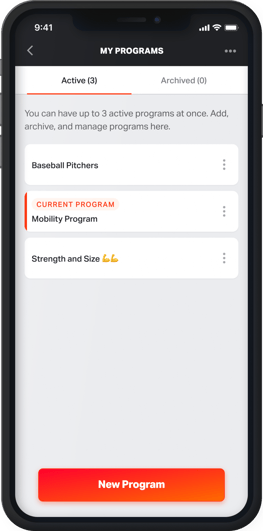
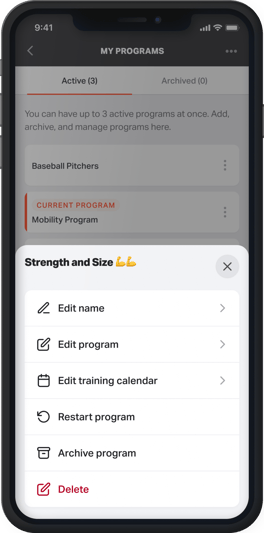
Tap Manage in the program switcher to open the My Programs page, where you can see all of your programs in one place and:
- Rename a program so it's easy to recognize
- Adjust the dates of a program
- Restart a program from the beginning
- Archive a program you're finished with
To manage a program, tap the ellipsis (…) menu on the right to pop the actions drawer.
Note: You can have up to 3 active programs at a time. Archiving a program you're not currently using frees up a slot for a new one.
Frequently Asked Questions
Will my progress be saved if I switch programs?
Yes. Switching programs doesn't erase anything — your history, stats, and progress on each program are preserved. You can pick right back up where you left off.
Can I delete a program instead of archiving it?
You can archive programs you've started. If you're an athlete with an organization, programs created and managed by your coach can't be archived or deleted by you — reach out to your coach if one needs to change.
I don't see a "New Program" option. Why?
If you train with an organization, your coach controls whether athletes can create their own programs. If you don't see the option, your organization has it turned off — check with your coach.
Why it matters
Training goals rarely fit into a single program. Multiple programs lets you keep everything you're working on organized and a tap away — so you can train how you want, when you want, without losing your place.