
How to favorite a movement
Tap the star icon on any movement to favorite it. You can do this from just about anywhere you can view movement details, including:
- The movement index / Content Library
- The training editor (program workouts)
- Program and activity templates
To remove a favorite, tap the star again to un-star it.
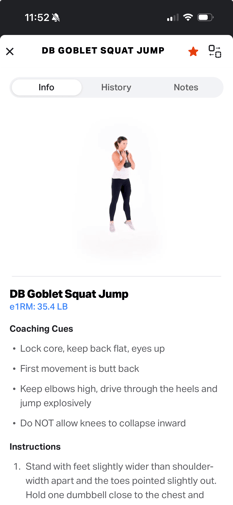
Where your favorites show up
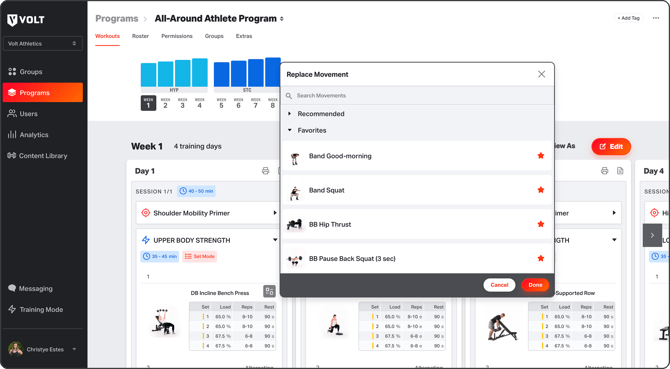
When you go to add or replace a movement, your favorites appear in a dedicated Favorites section at the top of the menu — expanded by default and sorted A–Z, so your go-to movements are always right where you expect them.
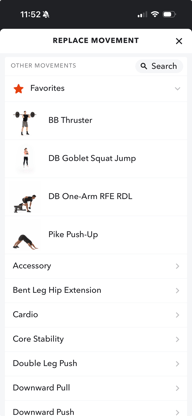
Favorites in the Coach Platform
Favorites work across both the Coach Platform and the Training App.
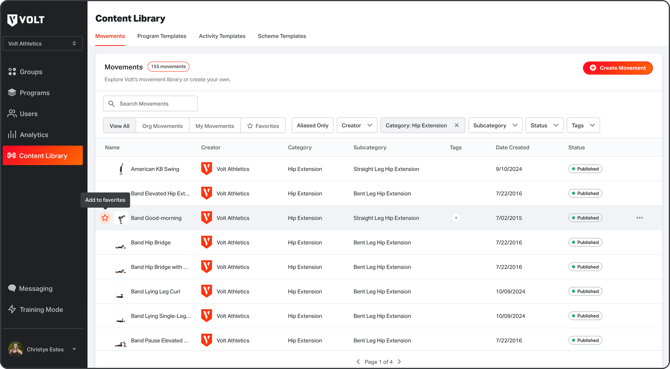
In the Coach Platform, coaches can star movements anywhere you build: the Movement Library, Training Editor, and program & activity templates.
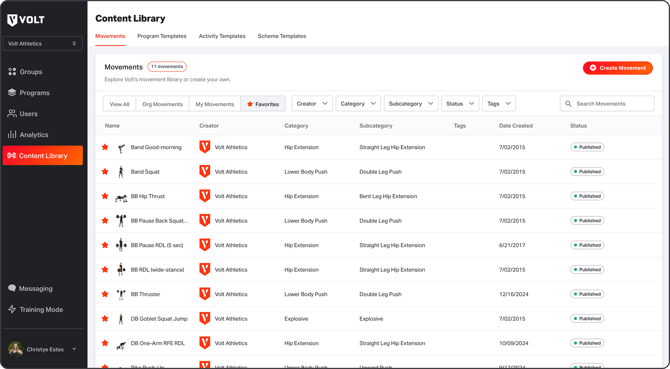
Your favorite movements will surface in the Add Movement and Replace Movement menus across the platform — including in View As and Training Mode. Each user’s favorites are their own.
Favorites everywhere you train
Favorites work across both the coach platform and the training app. Athletes can favorite movements too, including within View As and Training Mode — so whether you're a coach building a program or an athlete swapping a movement mid-workout, your favorites travel with you.
Frequently Asked Questions
Are my favorites shared with my whole team?
Favorites are personal to each user — your starred movements are yours.
Is there a limit to how many movements I can favorite?
No. You can favorite as many movements as you want!
If I search for a movement I've favorited, will it show up twice?
No. A starred movement appears only once in your search results, even though it also lives in your Favorites section.
Why it matters
The movements you use most shouldn't be the hardest to find. Favorites cut out the scrolling and searching, making program building and in-workout swaps faster for coaches and athletes alike.