
Every organization has its own language for training. Maybe your coaches call it a "Trap Bar Deadlift" instead of a "Hex Bar Deadlift," or you have specific coaching cues you want every athlete to see.
What you can customize
An alias lets you override how a Volt movement appears to everyone in your organization, including:
- Name — rename the movement to match your terminology
- Instructions — tailor the how-to text for your athletes
- Coaching cues — add the guidance your staff wants emphasized
- Recommended replacements — control which movements are suggested as swaps
- Default schemes — match the movement's loading approach to your programming
Everything else about the movement (like its demo video) stays the same.
How to create a movement alias
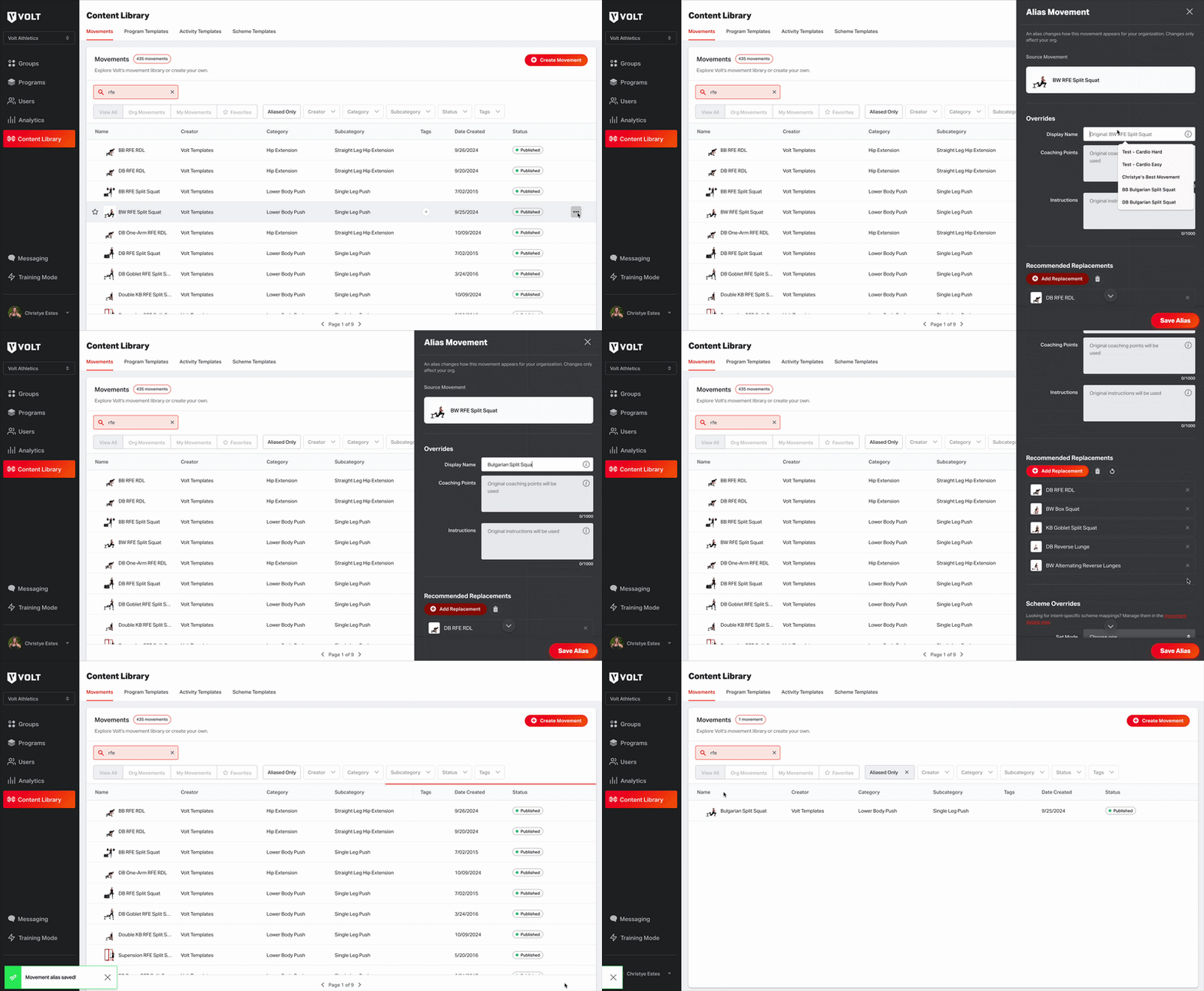
- Find the movement in your Content Library.
- Open the movement's ⋯ (ellipsis) menu and select Create Movement Alias.
- The alias form opens pre-filled with the movement's current settings — change only what you want to customize.
- Save. Your customizations now appear for all users in your organization, in both the coach platform and the training app.
If a movement already has an alias, the menu option changes to Edit Movement Alias so you can update it anytime.
Reverting to the original
Changed your mind? Deleting a movement alias removes all of your customizations and reverts the movement back to Volt's original name, instructions, cues, replacements, and schemes.
For management organizations
If you manage multiple organizations, aliases created at the management org level automatically flow down to all of your child organizations as their new defaults. Each child org can then layer its own customizations on top — no need to recreate aliases site by site.
Frequently Asked Questions
Who can create movement aliases?
Only users with the Admin role on an organization can create, edit, or delete movement aliases.
Does an alias change the movement for other organizations?
No. Aliases only apply within your organization. Volt's underlying movement stays the same for everyone else.
What's the difference between an alias and a custom movement?
Custom movements are ones your organization creates and owns outright — you can edit those directly. Aliases let you customize movements you don't own, like those in the Volt Library, without duplicating them.
Can I upload my own images or videos to an aliased movement?
Not at this time. Aliases cover names, instructions, cues, recommended replacements, and default schemes — media and equipment settings stay as-is.
What do athletes see?
Athletes see your customized name, instructions, and cues in the training app — it looks like it's always been that way.
Why it matters
Your movement library should speak your organization's language. Aliases let you fit Volt's library to your terminology, your coaching style, and your programming — while keeping all the movement data and history that comes with the Volt Library.